
Open it with the Step 5 card (Behaviour Analysis), or run cube_analyser.py.
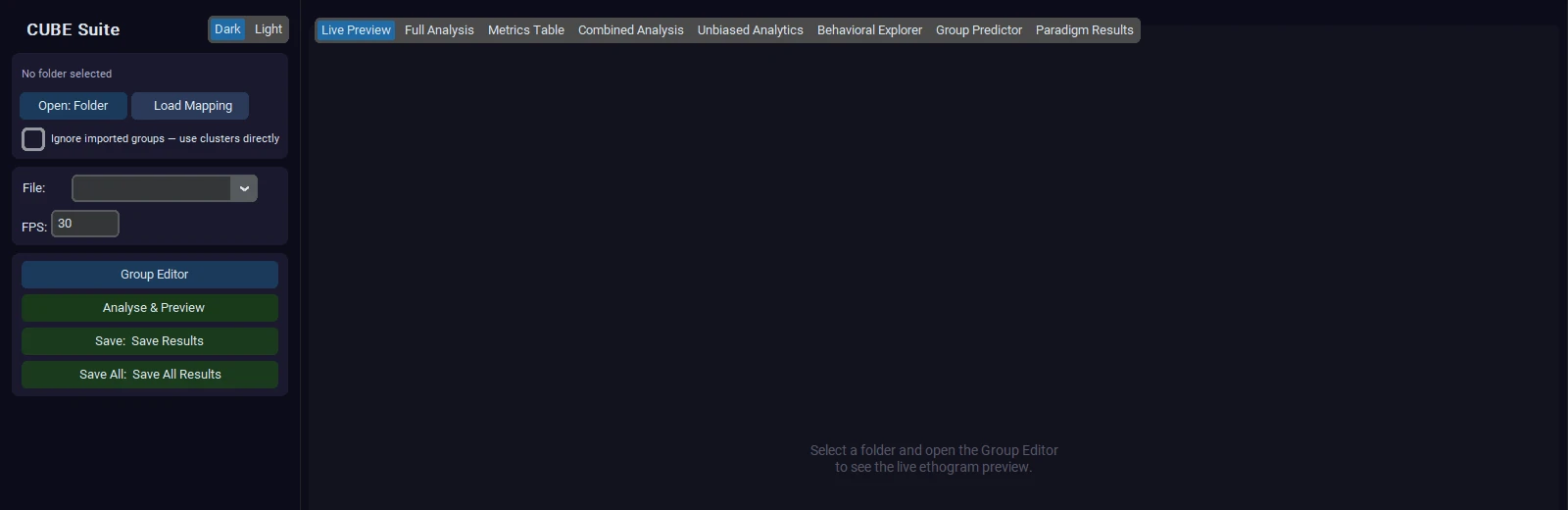
The left panel holds the folder controls: Open: Folder loads a Step 3 output folder, Load Mapping loads a saved mapping from clusters to behaviour names, File and FPS select one animal, Group Editor merges clusters into named behaviour groups, Analyse & Preview draws the analysis for the selected file, and Save Results and Save All Results export figures and tables.
On opening a folder, the Analyser finds all *_bout_lengths_hmm.csv files (or the raw ones) in the bout_lengths folder, loads one animal per file, and loads your Step 4 names automatically. The tabs are:
| Tab | What it is for |
|---|---|
| Live Preview | An ethogram of the selected file that updates as you edit behaviour groups |
| Full Analysis | The plots for the selected file, drawn by Analyse & Preview |
| Metrics Table | The per-behaviour metrics of the selected file |
| Combined Analysis | All animals together: set groups, compare them, export |
| Unbiased Analytics | Statistics, effect sizes and automatic reclustering across groups |
| Behavioral Explorer | How transitions, dwell times and sequences differ between groups |
| Group Predictor | Whether the behavioural profile can tell groups apart |
| Paradigm Results | Paradigm-specific reports (needs arena tracing) |
Combined Analysis tab#
The tab shows the animal list on the left and the analysis on the right.
- Labels. Give every animal a Label 1 (usually its experimental group, for example "Control" or "Drug"), and optionally Label 2 and Label 3 / Animal ID. Group by chooses which label defines the groups. Label 3 is also used to pair the same animal across time points.
- Run Combined Analysis draws a behavioural fingerprint heatmap (how much of its time each animal spends in each cluster), ethograms (a timeline per animal with coloured bars), and group comparisons. Export Combined saves them.
- Min bout dur (s) (default 0.3) drops bouts shorter than this from every loaded animal before any statistic is computed, matching the pipeline's own floor. Changing it re-filters the loaded animals immediately, and the value is remembered per source folder. Set it to 0 to see the unfiltered bouts.
Unbiased Analytics tab#
Experimental design (under Statistical Settings, above Group by):
- Independent groups (default): different animals in each group, for example Control, Treatment A and Treatment B. The overall test is Kruskal-Wallis and the pairwise follow-up is Dunn's test (built in). Pairwise tests are corrected only among clusters whose overall test has p < 0.05 (option below). P-values are corrected for the false discovery rate across every cluster and panel shown together, so a star means the same thing on every panel.
- Repeated measures: the same animals measured at several levels of Group by (for example Baseline, Day 3, Day 7). Give matching animals the same Label 3 / Animal ID at every level. By default every animal with data at two or more levels is used (a mixed model); with that option off only animals present at every level are used. At least 3 animals are required. With fewer than 10 matched animals the overall test is a paired t-test on log usage (2 levels) or a repeated-measures ANOVA on log usage (3 or more levels); with 10 or more it is a Wilcoxon signed-rank test or Friedman's test. Pairwise follow-ups use the same rule and the same false discovery rate correction. The status bar reports how many animals were used.
- A mixed design (independent groups, each followed over time) is not available.
What the statistics report for each cluster (independent groups): whether the cluster is present in each group at all (a prevalence test, because a cluster that is absent in one group is a different kind of effect from a difference in amount), then, among animals that show it, whether its frequency or duration differs between groups. The result table is exported with the figures.
Plot modes
| Mode | What it shows |
|---|---|
| Top-N Bar | The N most frequent clusters ranked by group mean |
| Volcano | Effect size against significance for all clusters; with behaviour groups, clusters are coloured by group with a legend and a labelled ring at each group's mean |
| Heatmap | Cluster by animal usage matrix, ordered by Ward clustering |
| Elbow/Silhouette | Fit quality for different numbers of merged groups |
| Cluster Hierarchy | A live view of the cluster dendrogram (see Recombination guide) |
| Guided Merge | Automatic merging that stops by itself (see Recombination guide) |
| Recombination | A dendrogram of clusters grouped by how their usage changes (see Recombination guide) |
| Dist Matrix | Pairwise behavioural distance between animals |
| Transitions | Cluster-to-cluster transition probabilities |
| Grp Transitions | Group comparison of transitions, pair by pair (Mann-Whitney U, volcano plot with q = 0.05 and 0.10 lines) |
| Effect Sizes | Effect size (Hedges' g or paired dz) per cluster and group pair, marked *, ** or +; a forest plot with 95 % confidence intervals is saved with it |
| Group Omnibus | Jensen-Shannon and PERMANOVA tests on overall cluster usage, with a PCA of animals (independent groups) |
| Cluster Stats | Per-cluster summary: mean bout length, frequency, total time |
| Cluster Validity | Silhouette diagram and UMAP scatter of the primary clustering. The condensed-tree view is in plots/cluster_validity.png |
The Metric selector in the bar, volcano and heatmap views also offers each cluster's movement signature from cluster_kinematics.csv.
Statistics for small cohorts: options, tiers and effect sizes#
Most neuroscience cohorts have 5 to 12 animals per group. At that size a rank test followed by a strict correction across 20 to 30 clusters can miss large, real effects. A simulation of CUBE's own pipeline (25 clusters, 3 truly different, 6 animals per group, a 2.5 SD effect) found 41 % of true clusters at omnibus q < 0.05, 9 % for the pooled post-hoc pairs, and none at 4 animals per group. The options below keep false-discovery control (Benjamini-Hochberg is still applied) but stop the correction from being stricter than it needs to be. They are shared by Unbiased Analytics, Combined Analysis and Paradigm Results: the checkboxes sit in Statistical Settings (Unbiased, Paradigm) or behind the Stats options button (Combined). Change a setting, then re-run the analysis. Every export includes stats_policy.json recording the options in force.
| Option (default on) | What it does | Implication / when to switch it off |
|---|---|---|
| Show suggestive tier (+, q<0.10) and effect sizes | Adds a second, clearly labelled tier. *, **, *** still mean q < 0.05, 0.01, 0.001. + means 0.05 ≤ q < 0.10: a lead to follow up, not a confirmed result. The tier column in every CSV says confirmed, suggestive or ns |
Report only confirmed results as findings. Switch off if you want the classic single threshold |
| Post-hoc only where omnibus p<0.05 | Pairwise comparisons (Dunn's test, or paired tests) are corrected only among clusters whose omnibus test p < 0.05 (Fisher-protected testing). Other clusters report q = 1 and gated_out_by_omnibus = True in *_posthoc.csv |
Large gain in power with several groups (6 animals per group: 9 % to 89 % detection in simulation, about 2 % false positives per null cluster). Switch off to correct over every pair of every cluster |
| Paired t-test on log usage when n<10 | In repeated designs with fewer than 10 matched animals, pairs are tested with a paired t-test on log(1 + value) instead of Wilcoxon, and 3+ levels use a repeated-measures ANOVA on log(1 + value) instead of Friedman. A Wilcoxon test cannot reach p < 0.05 with 5 or fewer pairs (smallest p = 0.0625) and after FDR correction is usually stuck below 10 | Log usage is close to normal for durations and counts. If your data are heavily skewed with many zeros, compare with the option off; at 8-9 animals the two can behave similarly. Values that can be negative (indices) are not log-transformed |
| Repeated measures: use all animals (mixed model) | Animals with data at two or more levels are all used, with a random intercept per animal (likelihood-ratio test on log usage). Previously only animals present at every level were kept | Use when some animals are missing a session. It only replaces the complete-case test when it adds animals; otherwise the paired test above is used. The status bar reports how many animals were used |
| Skip features seen in <3 animals (power) | Clusters or transitions expressed by fewer than 3 animals are not tested (q reported as 1) so they do not enlarge the correction family | Rare features cannot be significant at small n anyway. Switch off to test everything |
| Show small-n note | One short line when the chosen test cannot reach significance at your n | Informational only |
Effect sizes with confidence intervals. A non-significant q at small n does not mean no effect. CUBE now always reports an effect size with a 95 % confidence interval: Hedges' g between independent groups, paired dz for repeated measures, Cohen's d against a reference for one-sample tests. As a rough guide, 0.5 is medium and 0.8 is large. A wide interval that excludes zero but with q > 0.10 marks a promising effect to replicate with more animals.
New views and files.
| Where | What | Saved files |
|---|---|---|
| Unbiased Analytics, Effect Sizes view | Heatmap of effect size per cluster and group pair, marked */**/+ |
stats_effects.png and stats_effects.csv, plus stats_effects_forest.png (effect with 95 % CI per cluster) |
| Unbiased Analytics, Group Omnibus view | Jensen-Shannon distance and PERMANOVA (Aitchison/CLR) permutation tests on overall cluster usage, with a PCA of animals. A single overall test before looking at individual clusters (independent designs) | stats_omnibus.png, stats_omnibus.csv, stats_omnibus_pcoa.csv |
| Unbiased Analytics, stats export | Post-hoc table gains tier, test, effect, effect_ci_low, effect_ci_high, n_pairs, gated_out_by_omnibus |
stats_posthoc.csv, stats.csv (columns tier, test_used) |
| Combined Analysis export | Effect size per behaviour group, metric and group pair; summary and post-hoc tables gain Tier, Test, effect columns |
combined_effects_*.csv/.png, combined_summary_*.csv, combined_posthoc_*.csv |
| Paradigm Results | Index bar charts show + for suggestive results and one-sample markers (†); each *_stats table gains the test used, tier and effect size with CI; one-sample results are saved with effect-size CIs |
*_stats.csv, *_one_sample.csv |
| Grp Transitions volcano (Unbiased) | A dotted line marks q = 0.10; exported pairs include Hedges' g with CI, number of animals expressing the transition and tier | grp_transitions_stats.csv |
All figures follow the dark or light theme and are saved together with their CSV by the tab's export and by Save All Results.
User-defined groups of clusters. Everything above also applies to behaviour groups you define in the Group Editor, not only to raw clusters. In Combined Analysis the tests run per behaviour group and metric (frequency, total duration, latency, mean bout) with the same options, and Export Combined writes combined_effects_* (effect size with 95 % CI per group, metric and group pair), combined_omnibus_* (Jensen-Shannon and PERMANOVA on overall behaviour-group usage; independent designs) and stats_policy.json next to the summary and post-hoc tables. In Unbiased Analytics the Top-N and heatmap figures show the behaviour-group panels with the same marks, and Export / Save All writes the group statistics into a behaviour_groups/ subfolder. The Effect Sizes and Group Omnibus views and the cluster-level stats_effects_* / stats_omnibus_* files remain per cluster. In the Group Predictor, behaviour groups used as features (Behavior groups or Mix) get the same target-group contrasts, effect sizes and omnibus tests.
Volcano plots with behaviour groups. The volcano plot colours each cluster by its behaviour group and lists every group in the legend with its cluster count. A ring with the group name marks each group's mean position, so a group's overall pattern can be read at a glance. Top-N clusters keep their group colour and are marked with a star and a pink ring; suggestive clusters (0.05 ≤ q < 0.10) have an amber outline and a dotted threshold line. The Grp Transitions volcano colours transitions by the behaviour group of the source cluster, with its own legend.
Suggested workflow for a small cohort. (1) Leave the defaults on and run the statistics. (2) Read the Group Omnibus result first: if the overall usage pattern differs, per-cluster results are more credible. (3) Look at Effect Sizes and the forest plot, not only the stars. (4) Treat * as a finding and + as a hypothesis to test in the next cohort. (5) Name behaviours and analyse behaviour groups rather than raw clusters when you can: fewer tests means a smaller correction.
[!NOTE] Pseudo-replication is still your responsibility: if the same animal contributes several sessions to one group, give it a Label 3 / Animal ID so sessions are averaged and the design is recognised as repeated measures.
Behavioral Explorer tab#
Group-level views of sequence structure: Diff Heatmap (difference between transition matrices of two groups), Dwell Violin (distribution of dwell times for each state and group), Sankey (flow of behavioural sequences per group), Group Transitions (transition probabilities per group) Group Networks (circular transition networks per group, above-chance edges only) and Energy Landscape (an occupancy-based landscape over the UMAP embedding: common states are valleys and rare states are peaks).
Group Predictor Tab#
The Group Predictor asks whether the full behavioural profile of an animal can tell its experimental group. It runs three models (based on frequency, total duration and transition probability), each evaluated with leave-one-out cross-validation and a permutation test.
- Assign experimental groups in the Combined Analysis tab first.
- Click Run Models with the default settings.
- Check the permutation p-value (green means significant) and click View on the best model to see its confusion matrix and the features that drive it.
The classifier can be an elastic-net logistic regression, a linear SVM, a shrinkage LDA or PLS-DA (see the target-group section below for when to use each). See GROUP_PREDICTOR_REFERENCE.md for algorithms, figures and interpretation.
Detecting one group among several (target group, contrasts and group statistics)#
With three or more groups the default models try to separate every group from every other. That is often the wrong question. In a baseline / saline / drug design you usually only need to know whether the drug group can be told apart from the other two; telling baseline from saline is irrelevant and only dilutes the result. The Target Group & Contrasts section of the sidebar handles this.
Step by step
- Load animals and assign experimental groups in the Combined Analysis tab (Label 1/2/3). Give each animal a Label 3 ID if the same animals appear in several groups (for example baseline and drug recordings of the same mice); CUBE then holds out all recordings of the tested animal together.
- Choose Predict by (Combined, or one label factor). The Target group list fills with the groups for that choice. Hover over the list to refresh it after reloading animals.
- Pick the Target group (for example
Drug). Leave(all groups)for the classic multiclass question. - Keep Pairwise contrasts and Group-level stats ticked. Click Run Models. The three models finish first; the contrast analyses appear below them a little later and the status line says when they are done.
- Click Export Results to save every table and every plot (PNG plus CSV).
What each control does, and what to try
| Control | Default | What it does | What to try |
|---|---|---|---|
| Target group | (all groups) |
Relabels animals as target vs rest; features, model fit, cross-validation and permutation test all optimise that single contrast (chance becomes 50 %) | Set it to the treatment group. Run once with (all groups) too: if the target run is much stronger, the other groups were diluting the signal |
| Pairwise contrasts | on | Also tests target vs each other group separately (all pairs when no target is set and there are 3+ groups), with BH-corrected p-values | Leave on. If the pooled "target vs rest" result is strong but one pairwise result is weak, the effect is specific to that comparison |
| Group-level stats | on | Omnibus usage tests, per-cluster effect sizes, bout-structure features | Leave on; it is cheap and answers which behaviours differ |
| CLR-transform usage | off | Centred log-ratio of cluster usage (cluster source only). Time spent in clusters sums to 100 %, so one cluster rising forces others to fall; CLR removes that artefact | Run once on and once off. If conclusions agree they are robust; if they differ, trust the CLR run when one or two clusters dominate the session |
| Feature source | Individual clusters | What the models see | Start with clusters. Try Behaviour groups when you have many noisy clusters or want interpretable features; use Mix to combine both |
| Algorithm | Elastic Net | Classifier for the three main models. Elastic Net (default): L1 selects, L2 shares weight across correlated clusters, gives probabilities. SVM (linear): same accuracy class, but its probabilities (Platt scaling) are less reliable at small n, so use it mainly as a cross-check. Shrinkage LDA: no tuning, very stable when animals are few; good when many features each carry a little signal. PLS-DA: projects onto 2 latent components, robust to collinearity and common in phenotyping work | Start with Elastic Net, then rerun with Shrinkage LDA. If you only have 5-8 animals per group prefer LDA or PLS-DA |
| Model agreement | on | Re-fits the same features with all four classifiers (leave-one-out only, no permutations) and compares them | Leave on. Conclusions that hold for all four are robust; if only one classifier finds the effect, treat it as fragile |
| Max contributors | 5 | Number of clusters/groups the model may use | With fewer than 20 animals keep it at 3-5 (roughly at most one feature per four animals). Use All only with 30+ animals |
| Permutations | 199 | Resolution of the p-value (smallest possible p = 1 / (n + 1)) | 199 while exploring, 999 for a figure you will publish. Pairwise contrasts use the same number |
Reading the outputs
- Classifier contrasts (
contrast_summary): one dot per contrast, with the area under the ROC curve (AUC) and its 95 % bootstrap interval. 0.5 is chance. Green means the BH-corrected q is below 0.05. The label also gives balanced accuracy and the minimum detectable accuracy, the accuracy a model must exceed to reach p < 0.05 given your sample size; if your observed accuracy is below it, you do not have the power to claim an effect. - Omnibus usage tests (
omnibus_usage_tests): the Jensen-Shannon distance and PERMANOVA ask whether the overall distribution of time across clusters differs between groups, before looking at any single cluster. The histograms are the permutation null; the red line is your data. The PCA plot shows animals coloured by group (R² is the share of variation explained by group). - Per-cluster effects (
usage_effects): a heatmap of Hedges g (effect size, A minus B; about 0.5 is medium and 0.8 is large) for the clusters with the largest effects.*marks q < 0.05 and**q < 0.01 after FDR correction across clusters. If the same animals appear in more than one group, a mixed model with a random intercept per animal is used; otherwise a Mann-Whitney test. Thetestcolumn in the CSV says which. - Model agreement (
model_agreement): balanced accuracy of the four classifiers on the same features, and a matrix of Cohen's kappa between their leave-one-out predictions (1 = identical predictions). Large differences between classifiers mean the result depends on the method;model_agreement_predictions.csvshows, animal by animal, which classifiers got it right. - Sequence features (
sequence_features,sequence_effects): bouts per minute, mean bout length, bout-length variability, usage entropy, transition entropy (how predictable the next behaviour is) and the share of the dominant cluster. Use them to see whether the drug changes how behaviour is structured, not just how much of each behaviour occurs.
Common situations
| Design | Suggested setup |
|---|---|
| Baseline vs saline vs drug, different animals per group | Target = Drug, defaults |
| Same animals recorded at baseline and after drug (repeated measures) | Give every recording a Label 3 animal ID. Target = Drug. Cross-validation holds out all recordings of the tested animal and the per-cluster tests use the mixed model |
| Three or more doses | No target; read the pairwise table, or set the highest dose as target |
| Sex or genotype as well as treatment | Set Predict by to one factor at a time, or Combined to treat each combination as a group |
Pitfalls
- Small groups. With fewer than six animals in a group the page shows a warning. Treat results as exploratory and look at effect sizes and confidence intervals, not only p-values.
- Pooled "rest" is not neutral. Target vs rest assumes the other groups behave alike. If baseline and saline differ, use the pairwise table.
- Accuracy is only valid for the chosen contrast. Do not quote a target-mode accuracy as if it separated all groups.
- Selection is optimistic until nested. If you pick the target after seeing the data, or run many configurations, correct for it. Use the nested permutation test for any claim you publish.
- No signal? Try a larger permutation count only after checking the minimum detectable accuracy; try CLR on; try Behaviour groups instead of clusters; check that the animals' recordings are long enough for stable cluster usage.
What is saved. Export Results (and Save All Results) wait for the background contrast analyses to finish, then write: the model summary, per-animal predictions, confusion matrices, feature importances and permutation nulls; every contrast plot as a PNG with its CSV (contrast_summary, model_agreement plus model_agreement_kappa and model_agreement_predictions, omnibus_tests plus omnibus_pcoa and omnibus_null, usage_effects, sequence_features, sequence_effects); and `run_config.json, which records the target group, classifier, feature source, permutations, CLR setting, group sizes, contrasts tested and all warnings, so every saved result can be reproduced and interpreted later.